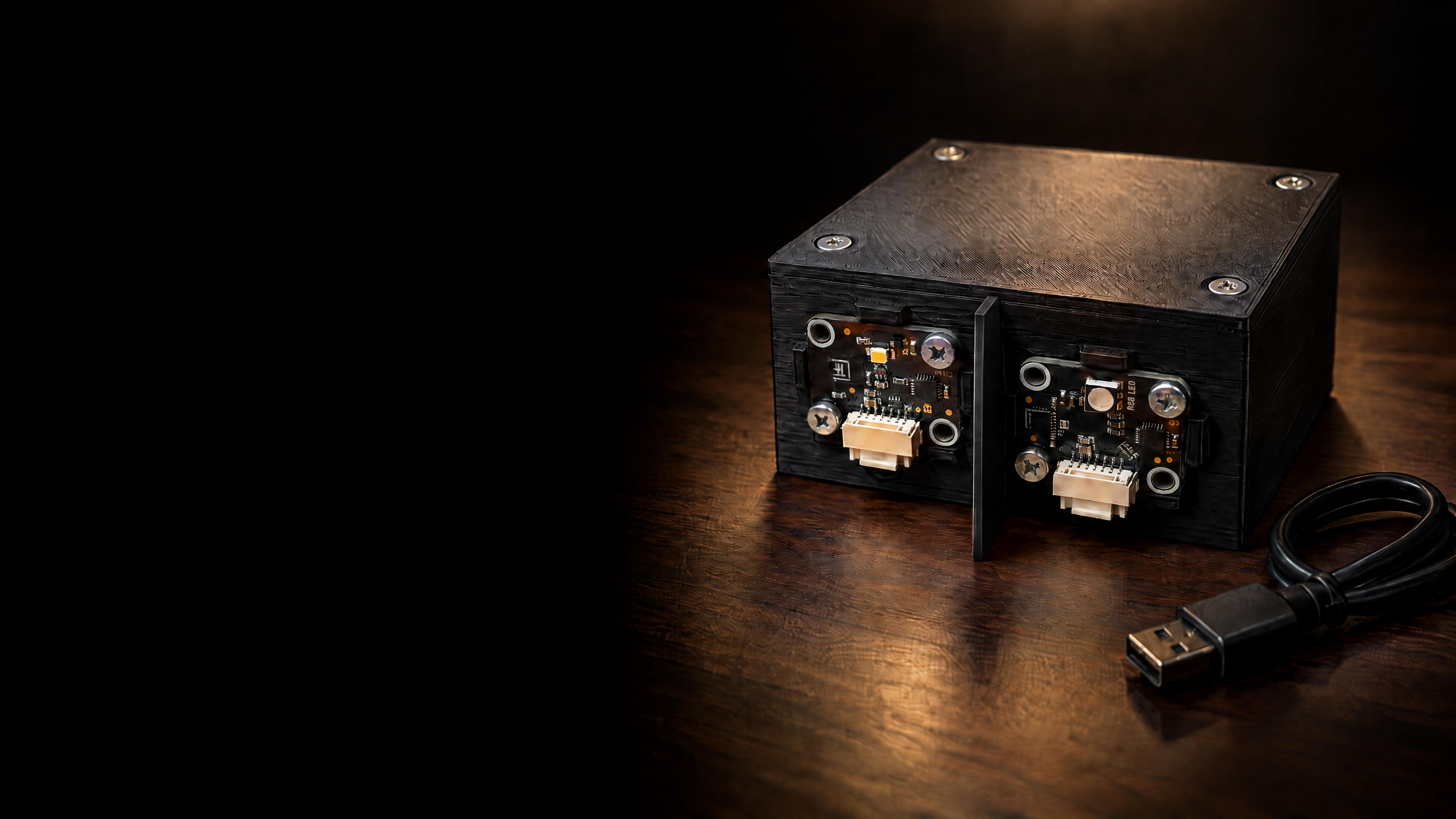
image: ai-generated from photos of the real device (gpt-image-2.5-sunburst)

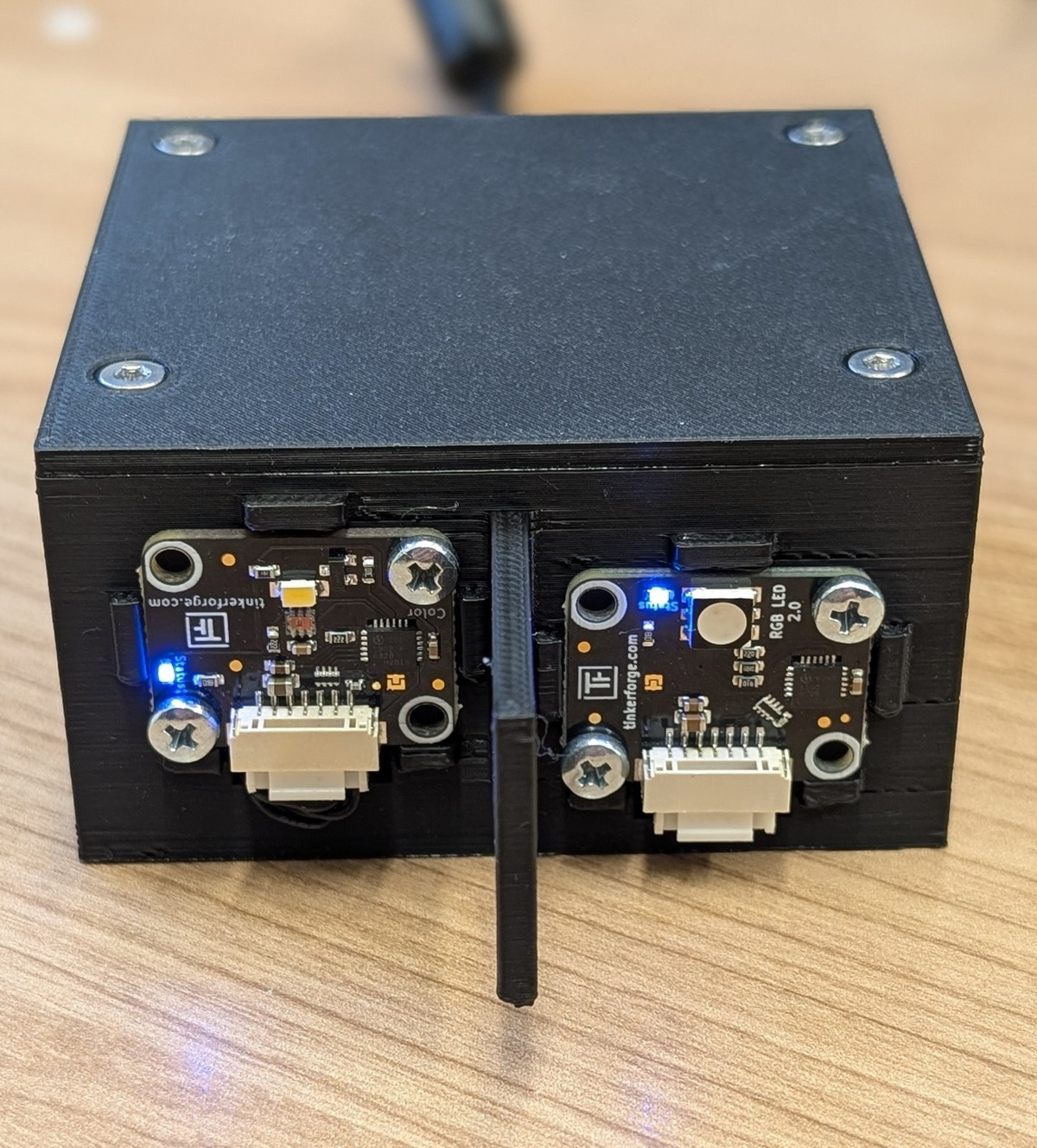
your device

the lifi device from the front
the eyea colour sensor, on the left
the lampan RGB LED, on the right
the wallso the device does not see its own lamp
insidea Master Brick, connected to your laptop by USB

yours from next monday

two devices per team, one for each of you.
you get them next monday, and keep them until january.
find your partner by then. today, your laptop gets ready.

from your idea to the light

do you know who these are?
Claude Code
Claude Code
Anthropic
Codex
Codex
OpenAI
OpenCode
OpenCode
open source
logos are trademarks of their owners.

you know this already

a chat, like  ChatGPT
an agent, like  OpenCode
one question, one answer
one task, until it is done
you paste in what it needs
it reads your files itself
you copy its code into a file
it writes the file itself
you run it and report back
it runs it and reads the result
you decide the next step
it tries again, until it works
the difference: it works in a loop, right where the work is.

the agent loop

you give the task. you check the result.
OpenCode
your assistant, set up for this course.
works on your laptop
in your course folder, with your files.
uses tools
reads and writes files, runs programs and commands.
knows the course
the website, the lecture notes, the module lifi_hardware.
it cannot see your device
the lamp has the last word.

the program and the model

models differ: free or paid, faster, or better at code.
what you type travels to that server.

your model

free models first
OpenCode comes with free models. they work right away, without a key.
a key, if needed
for a stronger model, a key may follow later. you will hear about it.
a key is only for OpenCode
never into a chat, a file or a screenshot. whoever has a key works at its owner's expense.

its memory: the context window

it remembers only this session.
the window has a size, counted in tokens.
when it is full, it compacts: old parts shrink to a summary.
new task, new session.
what should last goes into a file it reads at every start, like its course instructions.

careful, not scared

it asks first
changes and commands wait for your OK. read, then allow.
it works in your course folder
keep private files out of it.
it can be wrong
and it sounds just as sure. run it, measure it, check it.
it can make mistakes
one OK too quick, and a file is gone. keep a backup of what matters.
you can stop it
any time, with the stop button.
your chat leaves your laptop
no passwords, no keys, no personal data in the chat.
you decide what it may do.

part 1, by hand

1install OpenCode Desktop.
2download the course folder as a zip and unpack it.
3open the folder in OpenCode and start a session.

part 2, your assistant takes over

/onboarding
it asks you three questions.
it installs Python, lifi_hardware, VS Code, Brick Daemon and Brick Viewer.
it checks every step before the next one.
no device yet? it skips the device test.
image: ai-generated (gpt-image-2.5-flare)

the finish line

your laptop is ready for your device.
next monday, this LED lights up green.
image: ai-generated (gpt-image-2.5-flare)

a program is a file

in VS Code, create a new file in my-code: hello.py
the ending .py says: this text is Python.
a program is plain text,
until Python runs it.

your first line

print("Hello, world!")
save it. then open a terminal (terminal › new terminal) and type:
cd my-code python hello.py
Hello, world!
on a mac: python3 instead of python.

asking and answering

name = input("What is your name? ") print("Hello, " + name + "!")
What is your name? Ada
Hello, Ada!
input() waits until you press enter, and hands back what you typed.
name is a variable: a name for that value, so you can use it again.
the task
write a timer for the terminal. it asks how many seconds, then counts down, one line per second.
a coloured lamp shows how it stands: green while it runs, yellow in the last five seconds, red when time is up.
image: ai-generated (gpt-image-2.5-flare)

cut it into steps

1get the number of seconds from the userinput()
2check if the input is validwhile
3count down each secondfor
4show a coloured lampdef
5decide which colourif / else
more on this: cutting problems
one step at a time, and run it after each one.

and your assistant?

ask it like this:
“explain what input() hands back.”
“read my timer.py. is step 2 right?”
“run it with five as input. what goes wrong?”
“give me a hint for step 3, not the code.”
let it explain, not only write.

where we are · next: step 1

1get the number of seconds from the userinput()
2check if the input is validwhile
3count down each secondfor
4show a coloured lampdef
5decide which colourif / else

step 1 · get the number of seconds

text = input("How many seconds? ") seconds = int(text) print("Timer:", seconds, "seconds")
input() always hands back text, even if you type 20.
int() turns the text into a whole number, so you can count with it.

what if someone types five?

How many seconds? five
Traceback (most recent call last):
File "…\my-code\timer.py", line 2, in <module>
seconds = int(text)
ValueError: invalid literal for int() with base 10: 'five'
read it from the bottom: the last line says what went wrong.
above it: where. the file, line 2, and the line itself.
stuck? ask your assistant.
it can run your program itself and read the error.

where we are · next: step 2

get the number of seconds from the userinput()
2check if the input is validwhile
3count down each secondfor
4show a coloured lampdef
5decide which colourif / else

step 2 · check if the input is valid

text = input("How many seconds? ")
while not text.isdigit():
text = input("Digits only, please: ")
seconds = int(text)
text.isdigit() is true if the text has only digits.
while asks again, as long as the answer is not a number.

where we are · next: step 3

get the number of seconds from the userinput()
check if the input is validwhile
3count down each secondfor
4show a coloured lampdef
5decide which colourif / else

step 3 · count down each second

import time for remaining in range(seconds, 0, -1): print(remaining, "s") time.sleep(1) print("time is up!")
range(seconds, 0, -1) counts down from seconds to 1.
the indented lines repeat, once for every number. time.sleep(1) waits one second.

where we are · next: step 4

get the number of seconds from the userinput()
check if the input is validwhile
count down each secondfor
4show a coloured lampdef
5decide which colourif / else

step 4 · show a coloured lamp

def lamp(r, g, b): on = f"\033[48;2;{r};{g};{b}m" off = "\033[0m" print(on + " " * 12 + off, end=" ") lamp(0, 200, 0) print("running")
def gives a piece of code a name. r, g and b are its parameters.
you fill in the values when you call it: red, green, blue, each 0 to 255.
the strange codes inside? you do not have to understand them.

why functions help

a function hides the details.
you need to know what lamp() does, not how.
print() and input() are functions too. did you miss their insides?
next week, led.set_color() hides a whole device.
curious? open it up with your assistant.

where we are · next: step 5

get the number of seconds from the userinput()
check if the input is validwhile
count down each secondfor
show a coloured lampdef
5decide which colourif / else

step 5 · decide which colour

for remaining in range(seconds, 0, -1):
if remaining <= 5:
lamp(255, 200, 0) # yellow
else:
lamp(0, 200, 0) # green
print(remaining, "s")
time.sleep(1)
lamp(255, 0, 0) # red
print("time is up!")
if the condition is true, the first block runs. otherwise, the else block.

where we are · all five done

get the number of seconds from the userinput()
check if the input is validwhile
count down each secondfor
show a coloured lampdef
decide which colourif / else

the whole program

import time def lamp(r, g, b): on = f"\033[48;2;{r};{g};{b}m" off = "\033[0m" print(on + " " * 12 + off, end=" ") text = input("How many seconds? ") while not text.isdigit(): text = input("Digits only, please: ") seconds = int(text) print("Timer:", seconds, "seconds") for remaining in range(seconds, 0, -1): if remaining <= 5: lamp(255, 200, 0) # yellow else: lamp(0, 200, 0) # green print(remaining, "s") time.sleep(1) lamp(255, 0, 0) # red print("time is up!")
the button copies all 23 lines. paste them into timer.py and read them there.
stuck? ask in this order

1your assistant
2your partner
3the team next to you
4nicolas

how to ask your assistant

say what you wanted to happen.
let it run the program, or send it a screenshot.
ask why, not only how.

every week

type /update-semester: new material arrives in your folder.
your own work lives in my-code. everything else gets replaced.

where are you?

OpenCode installed, course folder open
assistant answers
/onboarding done
hello.py runs
timer counts down
timer shows its colours
until next monday:
form a team of two.
finish the setup and your timer.
read “the project” and “challenge 0”.
next week, your device. lamp() becomes led.set_color().
image: ai-generated (gpt-image-2.5-flare)