Algorithms and Programs
Summary
An algorithm is a sequence of steps described so precisely that someone can carry it out without understanding what it is for. A program is that same sequence, written down completely enough for a machine to run it. The machine adds nothing and works in exactly the order you wrote.
In this chapter, we address the following questions:
- What turns a description into an algorithm?
- Where is the line between a procedure and a program a machine can run?
- Which building blocks does every program consist of?
- Why does a program not do what you meant, but what you wrote?
- Why does an algorithm sometimes never end?
- Why can a solution be correct and still be useless?
- How do you compare two solutions to the same problem?
This concept starts in Challenge 0, with your first lines of code. You need it properly from Challenge 1 and Challenge 2 onwards, and it stays with you after that.
Explanation
Problem Solving with Computers left one question open: how does the box actually do its work? Here is the answer, in two steps. First the algorithm, then the program.
You have already run one. In the first session you were the receiver: look at the card, decide which colour it is, write down the matching symbol, wait for the next one. Four lines, and you followed them without knowing what the message would say. That is what an algorithm is: a sequence of steps described so precisely that no question is left open, and whoever carries it out does not need to understand the purpose. That is also the difference from cutting problems. Cutting says which parts a task has; an algorithm solves one of those parts.
An algorithm is not yet a program. It can live on a piece of paper, and a person can run it. A program is the same sequence, written so that a machine can work through it, and that adds one requirement the paper version never had: it must be complete. A person fills in what was obviously meant. A machine does not. It runs what is written, in the order it is written, and nothing else.
Almost every error you will meet this semester comes from that gap. Not from something being broken, but from something else being written than was meant.
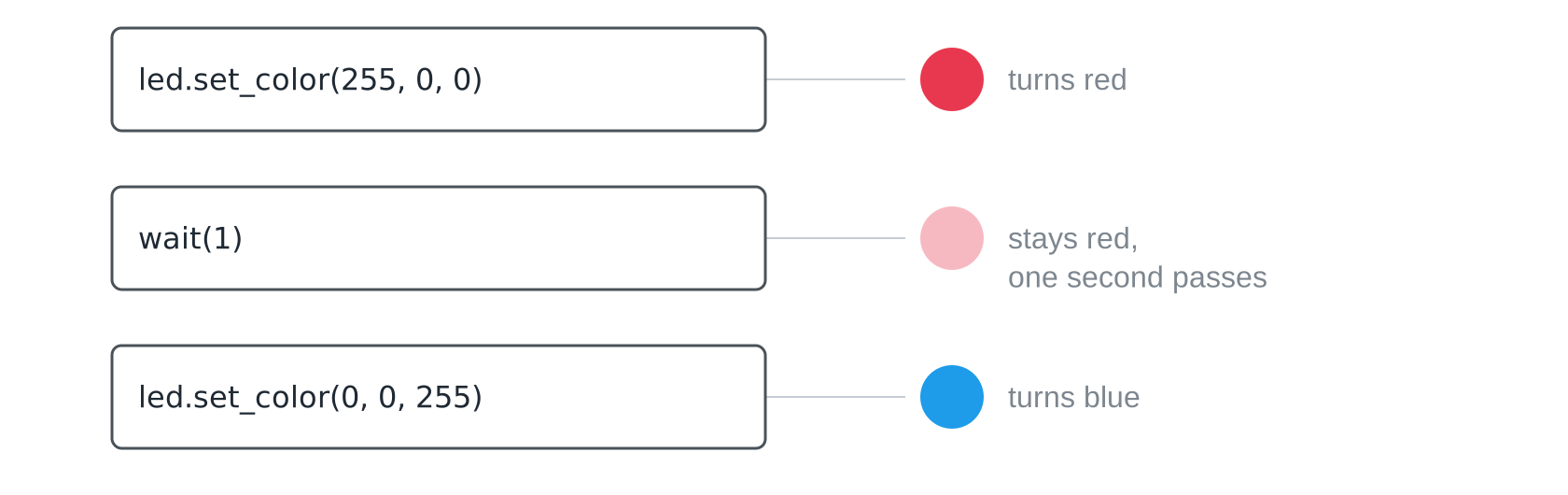
A single line has three parts. The first says which thing you are talking to, the second says what it should do, and the third says with which values. Change the values and you change the result, without touching the instruction itself.

The four building blocks
Every program in the world is built from four blocks, and you can see all four on one LED. Instructions one after another. A value with a name, so that a number you use in several places has exactly one place to change it. Repetition, so the same lines run again with the next value. And a condition, so a program can react instead of always doing the same.
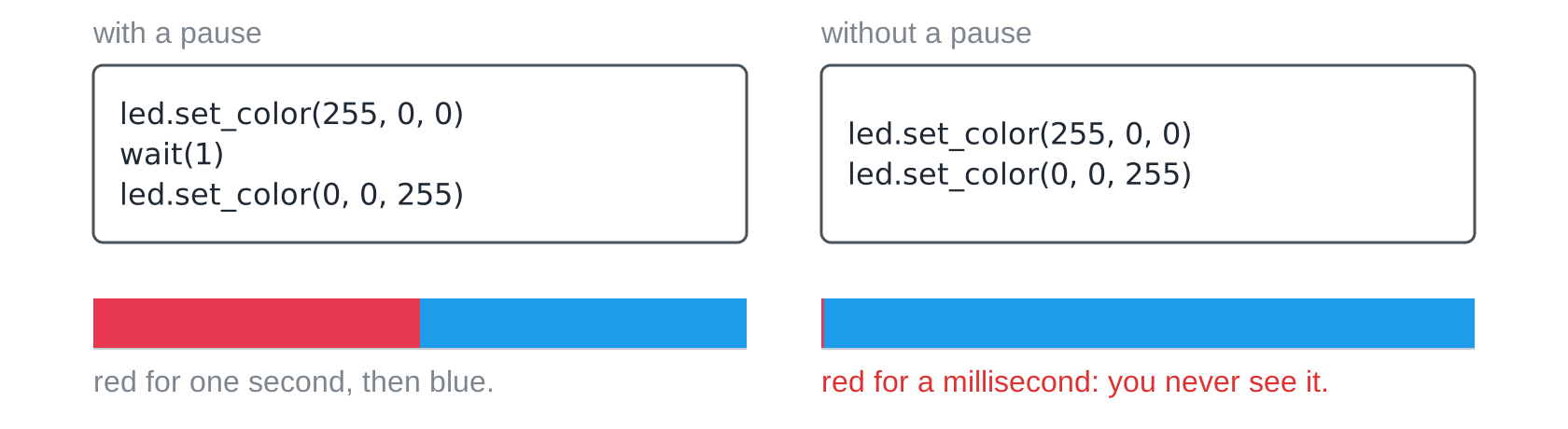
Because the machine takes you literally, it also waits only when you tell it to. Both programs below are correct. On the left, red stays visible for a second. On the right, red lives for about a millisecond, far too short for an eye, and you only ever see blue. The program is not broken. It is too fast for you.
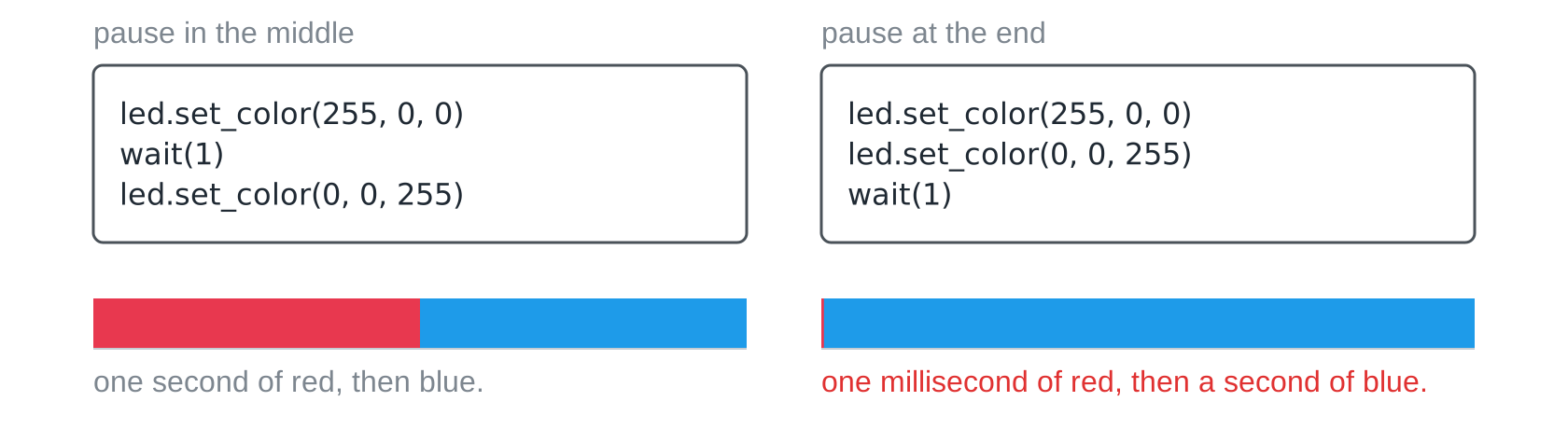
The order is part of the program too. Move the pause to the end and the machine switches red, switches blue immediately, and then waits a second with a blue LED. No line is missing, and it is still a different program.
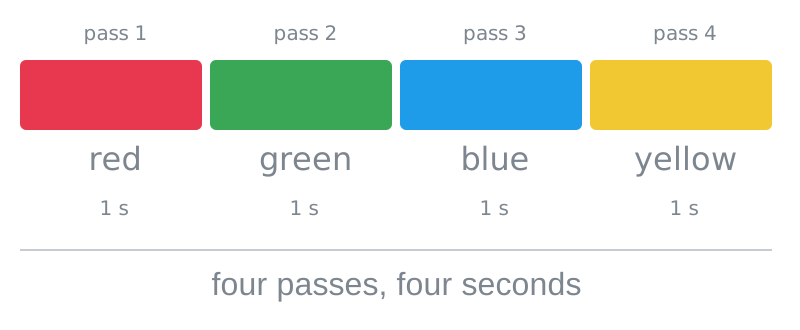
A loop is not magic either, it is a way of writing. The same lines run several times, each time with the next value from a list, one pass after another. That costs time as well: four passes with a one-second pause are four seconds.
When does it end?
A run ends only when its end is reachable. A loop whose condition is always true and whose body has no way out never ends. The machine does not notice that “nothing new is happening”; it runs what is written, forever. That is not automatically a mistake. For a blinking light the endless loop is exactly right, and your receiver will be a long-running loop at heart too. That one then needs a way out. When someone in the workshop says “my program hangs”, it almost always means the loop has no reachable exit.
Correct is the minimum
Two procedures can both be correct and still be worlds apart. Take the number guessing game from Cutting Problems: asking for every number one by one gets there, and so does halving the range. Both are correct. One of them asks up to 99 questions where the other needs seven, and with a thousand numbers it is 999 against ten.

So a solution can be correct and still be useless, and that is why procedures are compared by their cost: how many steps, how much time, how many measurements does it take, and how does that grow when the problem grows? For your transmission this becomes a concrete question: how many seconds is a file on its way?
The error message is information
Sooner or later a red block of text appears instead of a running program. It looks threatening and it is in fact a precise report: which file, which line, what stands there, and what exactly does not exist.

The machine did not fail. It did what was written and tells you exactly where it got stuck. Read the message out loud; most of the time it says literally what is wrong. And it is information about the program, not a verdict about you.
Working with the assistant
Asking “write me a program for the LED” gets you code. Asking “the LED should be red for three seconds, then blue, and explain each line before you write it” gets you code and understanding. The difference is that you said what should come out, which is also the test.
One rule holds this together: never keep code you cannot change. Every hand-over ends with a small change you make yourself, another colour, another waiting time. If you cannot make that change, you did not take the code over. You copied it.
Slides
The slides for this concept, right here. Page through them with the buttons in the top right corner, or click into the slides and use the arrow keys. The other buttons give you full screen, the slides in a new tab, and the deck as a PDF.
Practice questions
The practice questions have the same format as the exam, so they are also a good way to prepare for it.
Further reading
- Donald Knuth: The Art of Computer Programming, Volume 1. 3rd edition, Addison-Wesley 1997. The opening chapter defines what an algorithm is, and the five properties it names (finiteness, definiteness, input, output, effectiveness) are exactly the demands this page makes on your first programs.
- Brian Kernighan: Understanding the Digital World. 2nd edition, Princeton University Press 2021. Chapters 4 and 5 walk from an algorithm to a running program without assuming any programming experience, and they explain why the same correct idea can be fast or hopelessly slow.