Throughput and Limits
Summary
Throughput says how many usable bits arrive per second. It comes out of two numbers, the symbol rate and the bits carried by one symbol, and everything you spend on being understood gets subtracted from it: markers, frames, repeats. There are exactly three levers, they act independently of one another, and each has a different price. Where your own limit sits cannot be read off a datasheet and cannot be borrowed from another team. It is a measurement on your own setup, and it is the one number the whole of Challenge 4 is paid in.
In this chapter, we address the following questions:
- What does the speed of a transmission actually depend on?
- Why can you not simply send faster?
- Why do the deductions multiply instead of adding up?
- Why does reliability cost speed?
- Where is the limit of your setup, and how do you know?
You need this concept for Challenge 4. The third lever, sending fewer bits in the first place, is the neighbouring concept Compression.
Explanation
Two kilobytes. Twenty-seven minutes. That is not an invented number, it is yours: 2 KB are 16,000 bits, and with four colours at five symbols per second you get 10 bits in a second. The calculation was already on a slide back in session 7, but you only really understand it once you are sitting next to it, waiting. And that calculation does not yet contain a single symbol of framing or a single repeat.
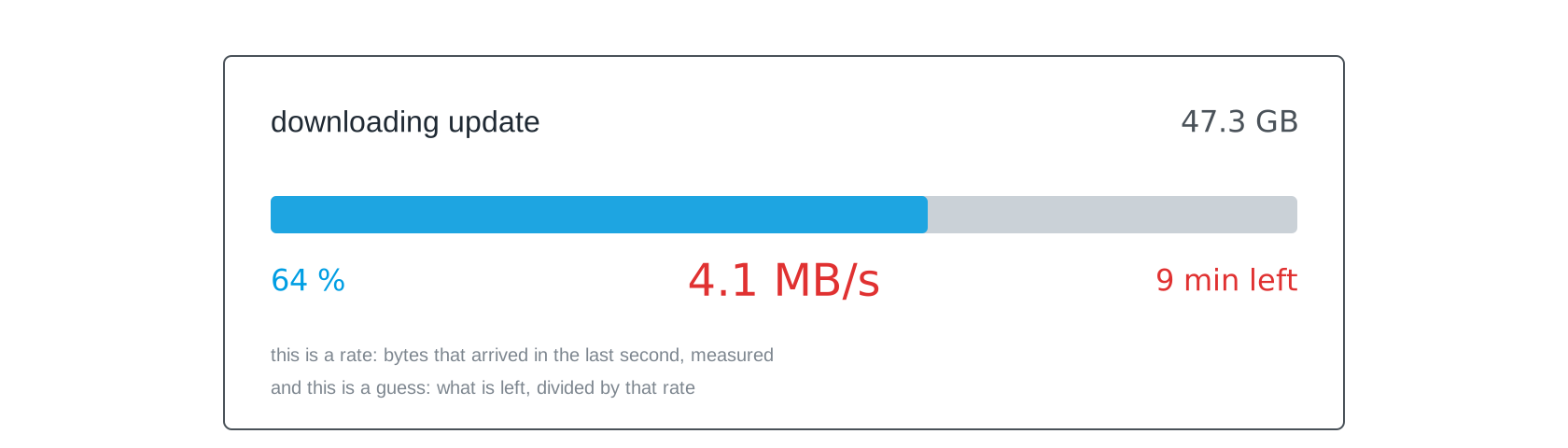
You know this screen from every game download and every update. Two different things stand on it. The rate is a measurement: that many bytes arrived in the last second. The minutes left are a calculation made from it: what is still missing, divided by that rate. When the rate drops from 12.4 to 4.1 MB/s, the estimate jumps from three minutes to nine although almost nothing has happened. Those two numbers are what this chapter is about, only for your light link, and in bits rather than megabytes.
Gross is not net
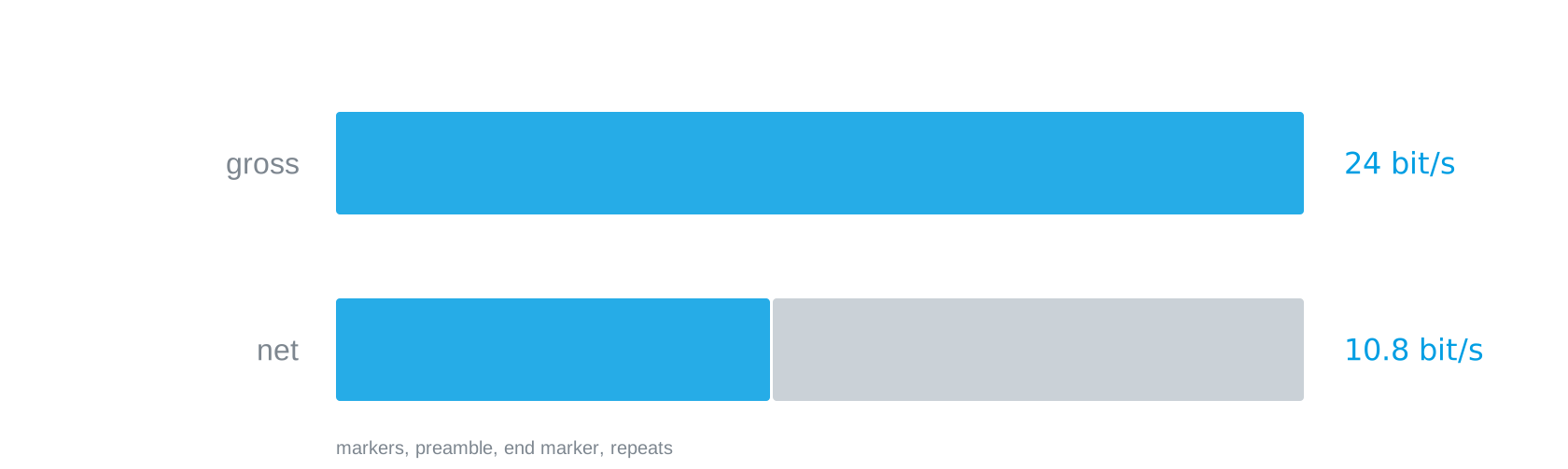
Notice how this comes about: not a single bit was lost. Everything arrived correctly. More than half of it was administration. Anyone talking about throughput has to say whether they mean gross or net, and the two can differ by a factor of two without anything being broken.
The deductions multiply
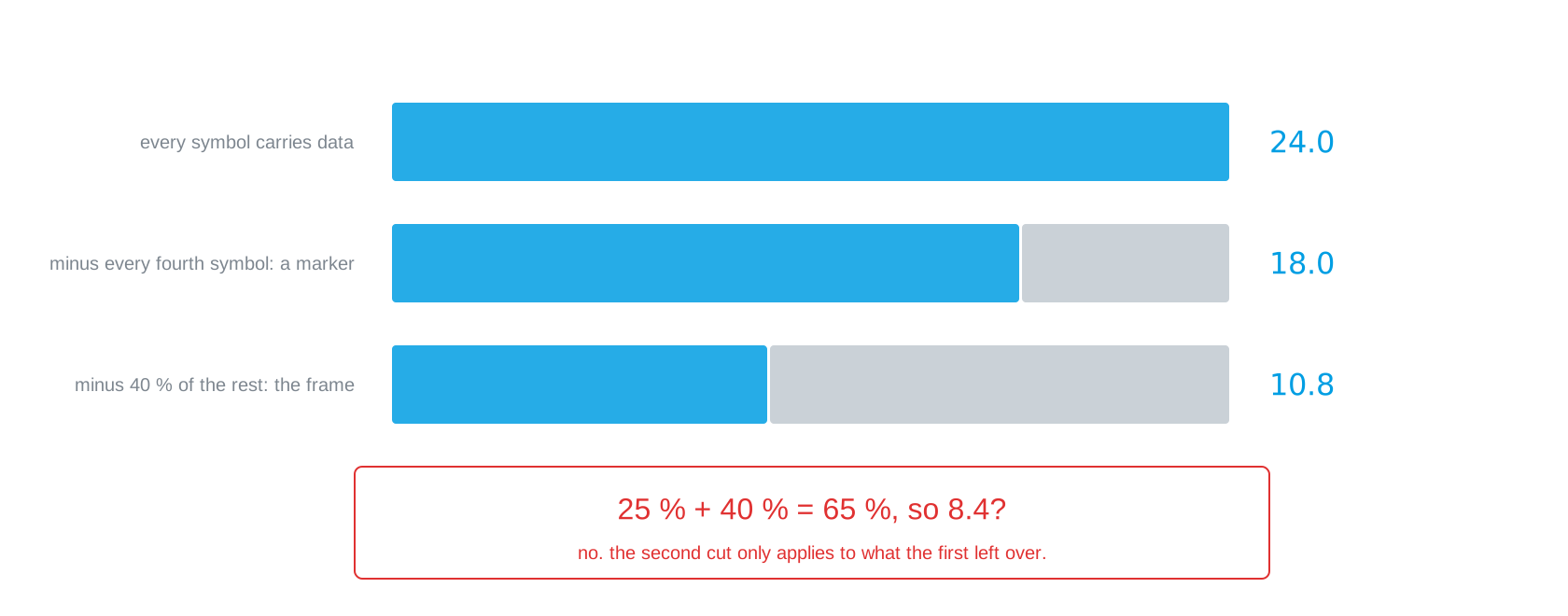
Work it through. 24 bit/s if everything were payload. Every fourth symbol is a marker, so three quarters remain: 18. Of those, 40 per cent go to preamble and end marker, because you are sending many short messages: 10.8 remain.
And here is the trap: 25 per cent plus 40 per cent is not 65 per cent lost. The second deduction only applies to what the first one left over. Shares that take effect one after another are multiplied, not added. The difference between 10.8 and 8.4 is not academic; it decides whether your file needs twenty-five minutes or thirty-two.
The bottleneck decides
The obvious thought is that sending twice as fast gives twice the throughput. It does, right up to the point where it does not.
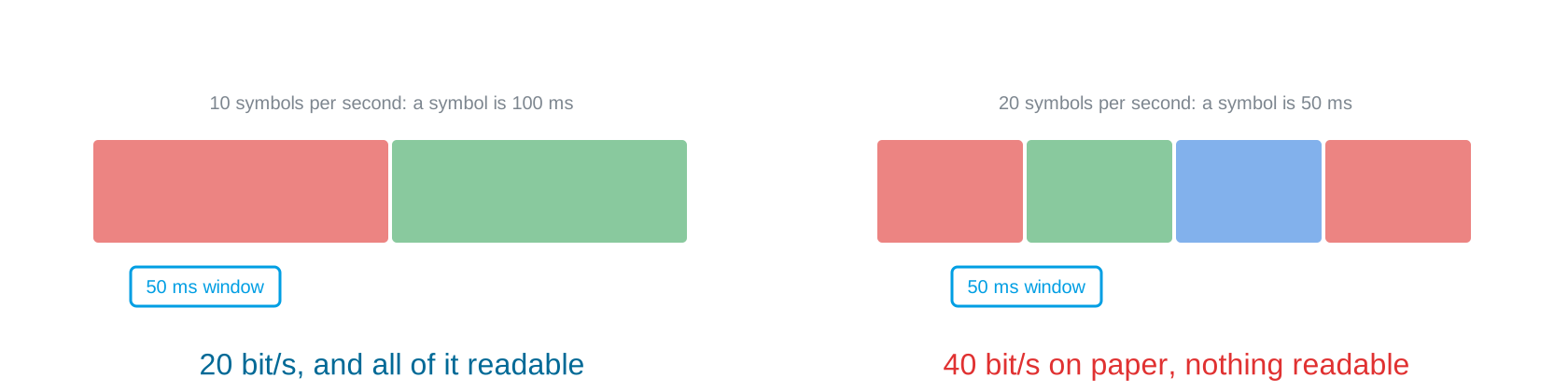
On paper the right-hand side manages 40 bit/s. In reality nothing readable arrives at all, because every reading now contains a colour change. Pulling a lever that is not the bottleneck gains you nothing; pulling it past the bottleneck makes things worse. The order is: shorten the measurement window first, then raise the rate, then check whether your scatter still allows it.
Your limit is a measurement
There are three things your limit is not. It is not the sensor’s datasheet: that describes the component and knows nothing about your distance, your ambient light or your optics. It is not the best team’s number: that holds for their setup, and the differences between setups are exactly what the ranking is made of. And it is not the arithmetic “rate times bits per symbol”: that says what comes out for values you choose, not which values your link supports.
There is only one way to it. Raise the rate step by step, count the errors, record the last error-free setting, and write down how you measured. That last part is the one people skip, and it is what makes the number worth anything the next time you rebuild.
Three levers, and only three
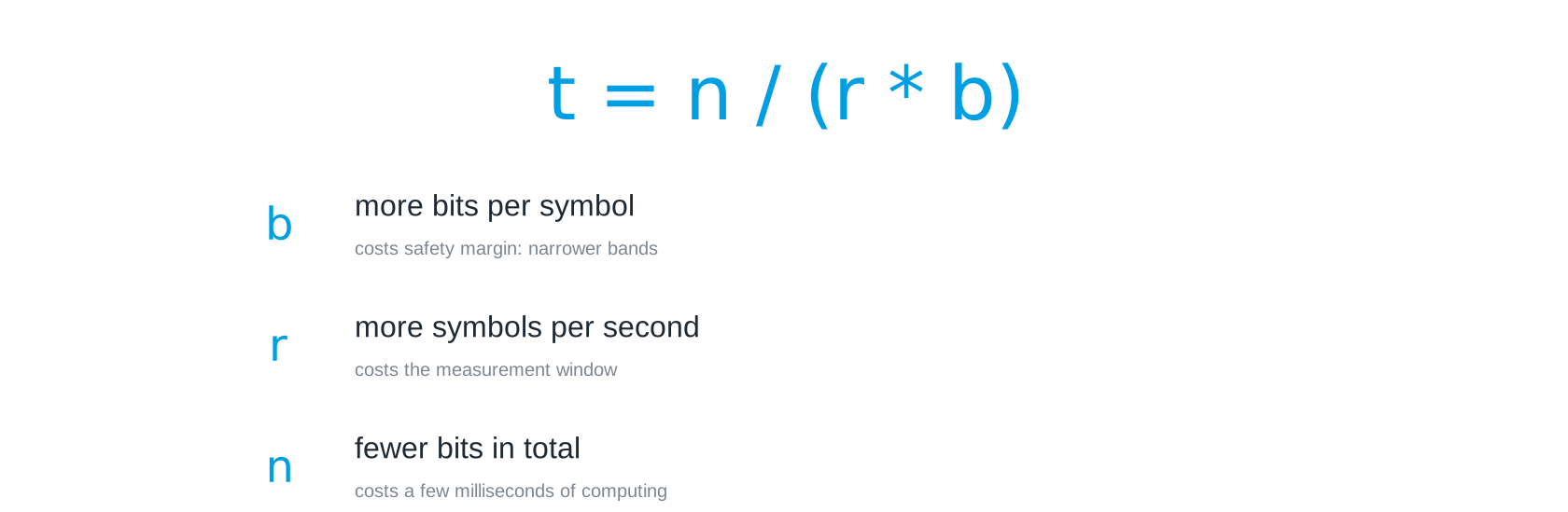
Time is \(t = n / (r \cdot b)\), with \(n\) the bits to send, \(r\) the symbols per second and \(b\) the bits per symbol. Three quantities, so three levers.
More bits per symbol costs safety margin, because the bands get narrower. More symbols per second costs measurement window, and that is where most teams find their limit. Fewer bits in total costs a few milliseconds of computing and nothing else, which is why it is often the cheapest, and it is the subject of Compression.
What is not on that list is a faster computer. The bottleneck is the link; at ten symbols per second your laptop spends most of its time waiting.
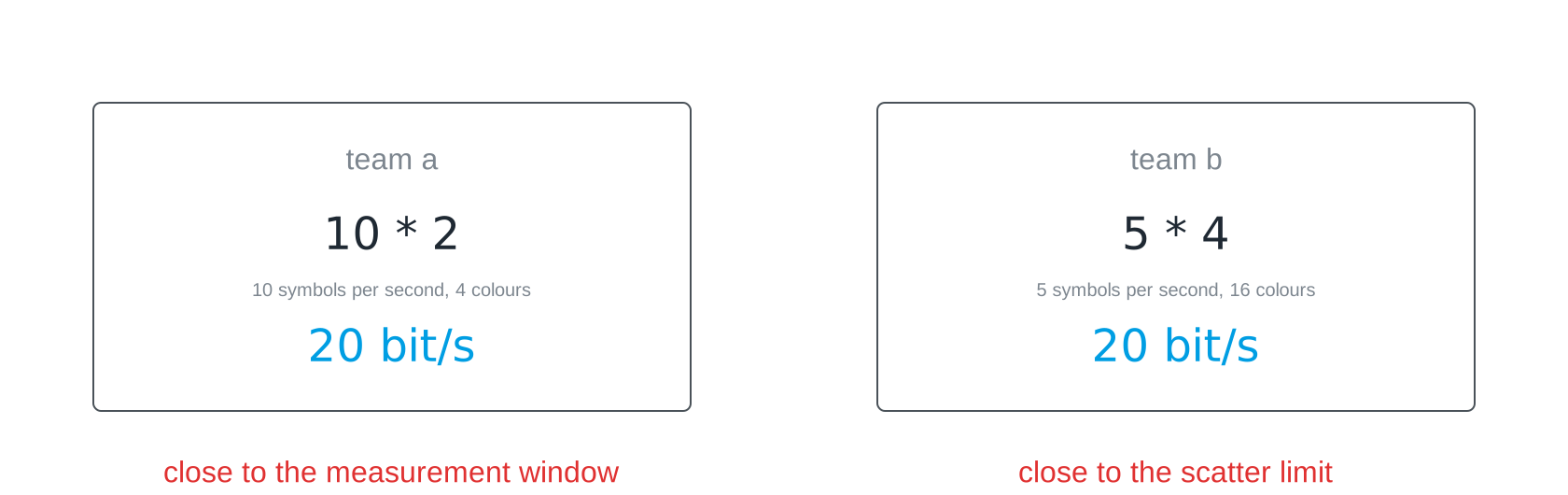
For throughput only the product counts, which is why 10 symbols with 2 bits and 5 symbols with 4 bits come out the same. But when something breaks, the two break for different reasons: one team is running against the measurement window, the other against the scatter. When you compare yourself with another team, compare not only the number but what it hangs on.
What reliability costs

With the back channel the receiver acknowledges, and anything that arrives damaged is repeated. Nothing is lost, everything eventually arrives. But for ten deliveries you send eleven, and that leaves 91 per cent. The difference from the obvious 90 is small here because the error rate is small. Do the same arithmetic with every second message: three transmissions for two deliveries, so two thirds. The curve gets steep quickly once a link is genuinely bad.
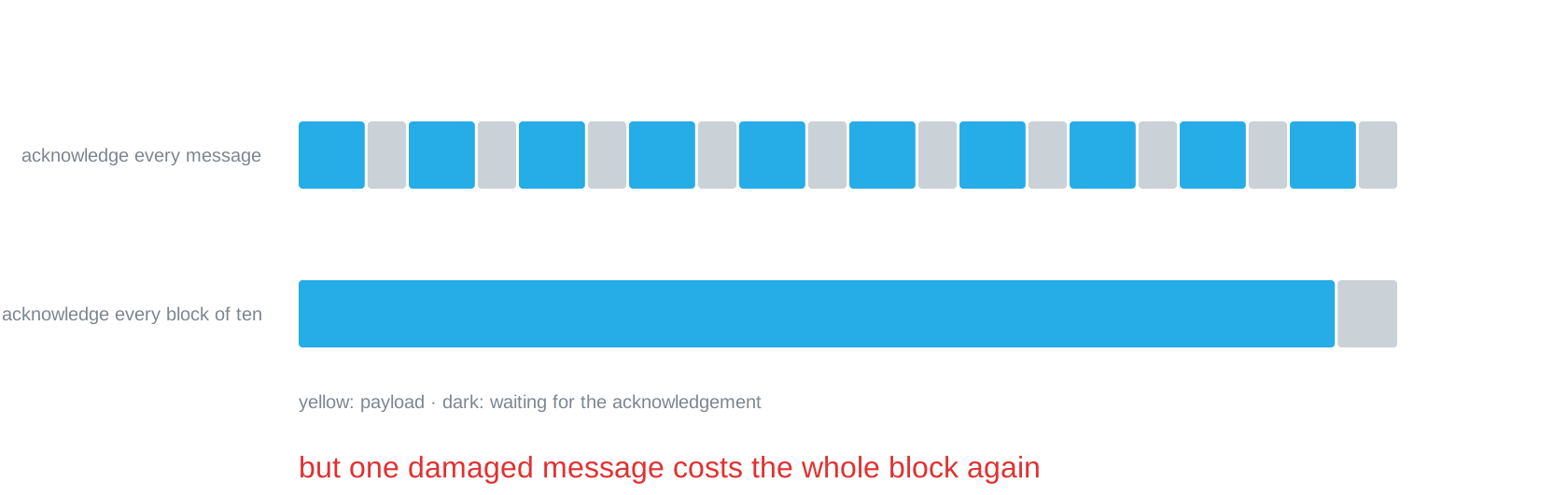
Every acknowledgement is a small transmission of its own, and while both sides wait, the link stands still. Acknowledging per block saves those gaps but makes a single error expensive. Which way wins depends on your error rate, and that is a number you measured. This is a trade-off with a measurement underneath it, not a matter of taste.
Throughput is not delay
One last distinction, and it is the one most often confused outside this course as well. Throughput says how much arrives in a running stream. Delay says how long the first thing takes. A fat line can react sluggishly and a thin one can be quick.
“Our link does 20 bit/s, so a one-byte command is there after 0.4 seconds” is wrong twice over. Around those eight payload symbols sit nine symbols of frame; on top of that come recognising the preamble and the receiver’s reaction time. A single short command is slower by a large factor than the rate suggests.
Slides
The slides for this concept, right here. They are the first deck of session 13; the second, Compression, takes the third lever apart.
Practice questions
The practice questions have the same format as the exam, so they are also a good way to prepare for it.
Further reading
- Claude E. Shannon: A Mathematical Theory of Communication. Bell System Technical Journal 27, 1948. https://doi.org/10.1002/j.1538-7305.1948.tb01338.x. The paper that put an upper bound on all of this. Section 1 is readable; the rest is there for when you want to know how far the idea goes.
- Andrew S. Tanenbaum, Nick Feamster, David Wetherall: Computer Networks. Pearson, 6th edition 2021. Chapter 3 works through acknowledgements, window sizes and repeats properly, with the arithmetic this page only sketches.
- Jeff Dean’s “Latency Numbers Every Programmer Should Know”, widely reproduced online. A list of durations from a cache access to a packet crossing the Atlantic. Worth reading once for the sense of scale: your light link sits at the very slow end, and that is what makes its costs visible.