Overview
The module, the project, and where everything belongs
This page is the map. It shows how the module is put together: the one question behind it, the four questions underneath, the eighteen concepts and their five colours, and the five challenges of the project with the concepts each of them needs. You will see this map again and again during the semester, on the slides and on this page, each time with the part lit up that we are working on. If you ever lose track of where you are, come back here.
One question, four questions
The module has one big question: how do computers solve complex problems? To answer it you need to understand what a computer does with information, and there are four things it does. It represents information, it stores it, it transfers it, and it processes it.
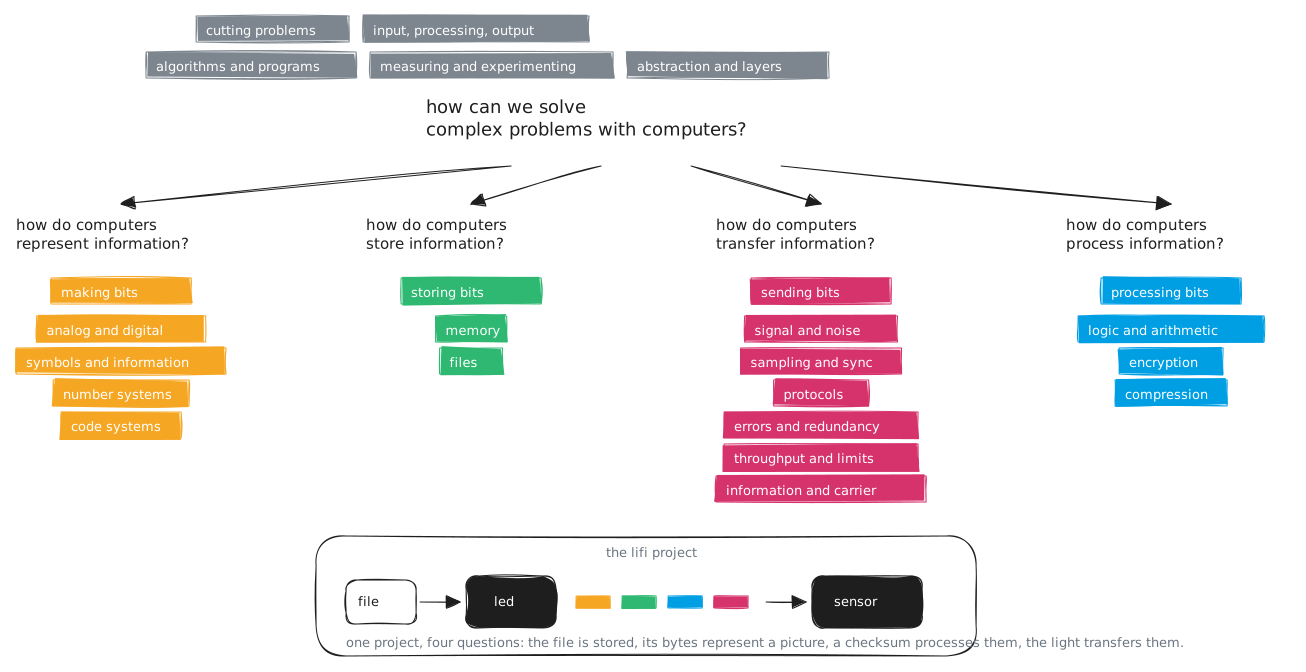
Each of the four questions has a colour, and the colour stays the same everywhere: on this page, on every slide, on every concept page. Whenever a session is orange, it is about representing information; whenever it is magenta, it is about transferring it. In one line each:
- Representing (orange, making bits). To a computer your photo is a list of numbers, and the numbers are states of something physical: a voltage, a magnetised spot, a flash of light.
- Storing (green, storing bits). The photo has to sit somewhere before it is sent and somewhere after it arrives.
- Transferring (magenta, transferring bits). The receiver does not know when a letter begins. The light it sees is never quite the light that was sent.
- Processing (blue, processing bits). Somebody has to turn the numbers back into a picture and check whether they arrived correctly.
Above the four questions sit five ways of working, in grey, because you need them everywhere and not just for one of the questions: cutting problems into pieces you can test, the model of input, processing and output, algorithms and programs, measuring and experimenting, and thinking in layers.
At the bottom of the map is the project, and this is why it is the project: your device touches all four questions. The photo is stored as a file. Its bytes represent a picture. A checksum processes them so the receiver can tell whether they arrived intact. And the light transfers them across the gap.
The concepts
Eighteen concepts, in five families. The order inside each family is the order in which you meet them during the semester; the last column says where in the project you need them. Every concept has its own page with a summary, the explanation, the slides, practice questions in the exam format, and further reading.
Solving problems (grey: how you think and work, needed everywhere)
| Concept | Where you need it |
|---|---|
| Cutting Problems | C0 to C4 |
| Input, Processing, Output | C0 to C4 |
| Algorithms and Programs | from C0, central in C1 and C2 |
| Measuring and Experimenting | from C1 |
| Abstraction and Layers | from C2 |
Representing information (orange: making bits)
| Concept | Where you need it |
|---|---|
| Analog and Digital | C1 |
| Symbols and Information | C1 |
| Number Systems | C2 |
| Code Systems | C2 |
Storing information (green: storing bits)
| Concept | Where you need it |
|---|---|
| Memory and Storage | C4 |
Transferring information (magenta: transferring bits)
| Concept | Where you need it |
|---|---|
| Signal and Noise | C1 |
| Sampling and Synchronization | C2 |
| Protocols | C2 and C3 |
| Errors and Redundancy | C4 |
| Throughput and Limits | C4 |
Processing information (blue: processing bits)
| Concept | Where you need it |
|---|---|
| Logic and Arithmetic | C4, first contact in C2 |
| Compression | C4 |
| Encryption | C4, optional |
The five challenges and what they need
The project is cut into five challenges. Each one adds exactly one new difficulty, and everything else stays as you already know it, so when something breaks you usually know where to look. Challenge 0 is not a competition; it ends when your LED lights up because you told it to and the sensor across the table notices. From Challenge 1 on, every team competes under the same conditions, and each challenge builds on the result of the one before.
| Challenge | The question it asks | |
|---|---|---|
| 0 | The Spark | Can you bring your device to life? |
| 1 | The Alphabet | How many different signals can your receiver tell apart reliably? |
| 2 | The Word | Can you send a whole word, and how fast? |
| 3 | The Listener | Can the receiver find the start of a message on its own? |
| 4 | The Packet | Can you send a real file, and get it there correct and fast? |
On the map, the early challenges are orange and magenta, representing and transferring. Storing and processing come together at the end, when a whole file travels through the air for the first time. If you are working on a particular challenge right now, these are the pages that go with it.
Challenge 0. Input, Processing, Output and Algorithms and Programs as soon as you write your first lines of your own. Cutting Problems starts here as well.
Challenge 1. Analog and Digital, Symbols and Information and Signal and Noise belong together and answer, between them, why the size of your alphabet is limited. Add Measuring and Experimenting, because this is the first time you need a proper series of measurements, and Algorithms and Programs, because your recognition rule is the first algorithm you invent yourselves.
Challenge 2. Code Systems and Number Systems for the way from a letter to a symbol, Sampling and Synchronization for the question why it falls apart at higher speed, and the first part of Protocols, the simple agreement. Abstraction and Layers starts here, because your link now has a bottom and a top.
Challenge 3. Protocols in full: framing, synchronisation, and how complete an agreement has to be.
Challenge 4. Logic and Arithmetic first, because checksums build on it. Then Errors and Redundancy, Memory and Storage for what travels through the air as a whole for the first time, Compression and Throughput and Limits. If you like, add Encryption.
Looking back. Abstraction and Layers is worth a second look at the end, once your finished system is in front of you.
The practical side of the project, the device, your partner, the tools and the documents every challenge produces, has its own page.
What the exam is about
The concepts. Your project is the material on which you explain them, but it does not replace understanding them. Whoever has passed every challenge and still cannot say why digital transmission tolerates noise does not pass the exam. The ranking in the competition does not count towards your grade. The exam is a one-hour multiple-choice exam on the concepts, and if all five of your challenges are accepted, you get a 5 % bonus on it. You will have to prepare for it, but you will not start from zero: by then you will have met every one of these concepts at your own device.
Slides
The slides from the first session, with the map built up step by step and once more with each challenge lit up. Page through them with the buttons in the top right corner, or click into the slides and use the arrow keys.